
SAP Business AI and FIS AI

10HomeDown, ProductsTags: ,

SAP Business AI and FIS AI
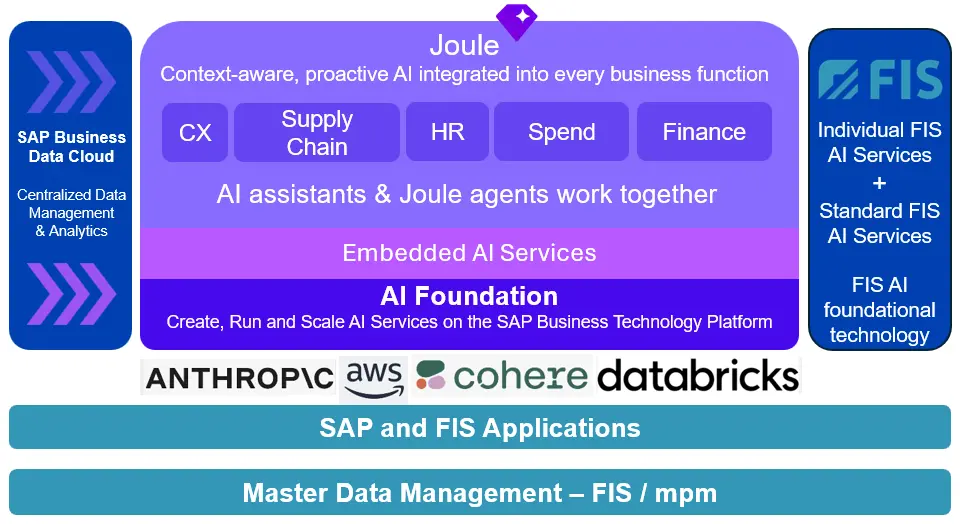
SAP Joule is SAP’s built-in generative AI copilot designed to help businesses navigate and automate tasks directly within their SAP cloud systems. Joule assistant—is similar to ChatGPT or Microsoft Copilot—but is specifically engineered to understand enterprise data, structures, and business processes.

Key Capabilities include

  • Natural Language Interactions: Users can speak or type in plain language to pull analytics, update profiles, or change records without manually navigating complex software menus.
  • Contextual Business Awareness: Because it is grounded in the SAP Knowledge Graph and your organisation’s specific tenant data, it answers questions with a full understanding of your company’s processes and compliance rules.
  • Task Automation: It handles both simple actions (like pulling a financial trend chart) and complex workflows (like posting vendor invoices or updating human resource data).
  • Cross-System Connectivity: Beyond SAP products, Joule is built on the SAP Business Technology Platform and integrates with third-party tools like Microsoft 365 Copilot.

Tailored Roles for Joule

SAP packages Joule’s AI capabilities into distinct versions depending on the user’s responsibilities:

For End Users: Embedded across core cloud suites like SAP S/4HANA Cloud (Finance/Supply Chain) to simplify daily transactional work.

For Consultants: SAP Joule for Consultants acts as a 24/7 expert that interprets complex ABAP logic, answers implementation questions, and reviews configurations using curated SAP documentation.

For Developers: SAP Joule for Developers operates inside tools like SAP Build to write code, generate automated application logic, build data models, and write unit tests from standard text prompts.

FIS / Nova

FIS / Nova as an AI agent that works within the FIS

The FIS / Nova agent Copilot works like an intelligent FAQ system: Users ask questions via voice input and receive relevant answers to better operate the (new) FIS products.

How does the FIS / Nova AI agent work ?

  • FIS / Nova uses SAP BTP AI services
  • The service has access to product-relevant documents such as product manuals
  • Users can search through documents using voice commands 

Core Benefits

FIS/Nova provides support to inexperienced employees in using FIS products

FIS / Nova is usable across all FIS/bxp solutions


AI and data thought holistically2026 Releases: SAP Integrated Software 2025 Releases: SAP Integrated Software2024 Releases: SAP Integrated Software2023 Releases: SAP Integrated SoftwareFIS awarded SAP Focus Partner 20232022 Releases: SAP Integrated SoftwareFIS / TradeFlex works with ManoManoFIS Announces Sale of Polish Subsidiary
 

AI Enhancements with Document Recognition (FIS / fci)

10HomeDown, ProductsTags: ,

AI Enhancements with Document Recognition (FIS / fci)

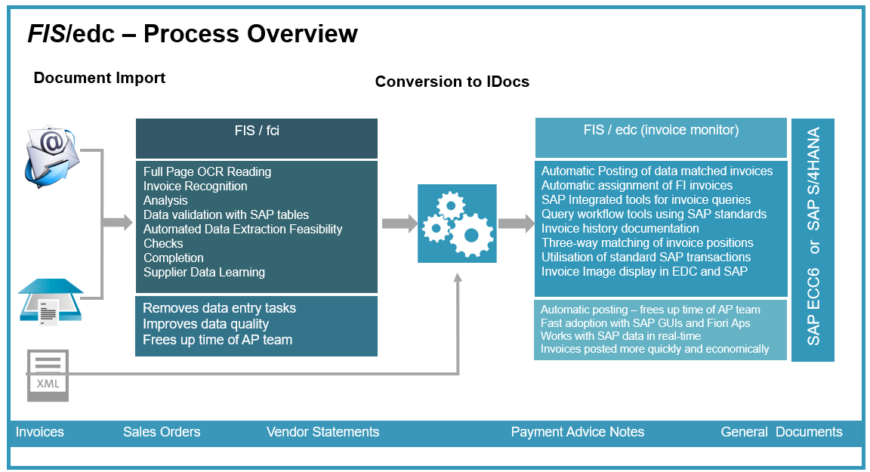
FIS/fci Cloud serves as a central entry component for all types of documents – whether incoming invoices, sales orders, order confirmations, delivery notices or payment advices. The solution uses a hybrid approach: a combination of AI-based recognition and classical OCR.

The software was an early example of utilising machine learning technology to train the system with data (i.e. from examples of specific vendor invoices) before automation.

FIS / fci Cloud have enhances recognition using AI

  • Document recognition takes place in two phases using a hybrid approach: AI and OCR
  • The AI model was trained with over 250,000 documents
  • A comprehensive database and the use of machine learning to further train AI recognition

Key Benefits

The Machine Learning engines significantly improved recognition quality – especially for new and unknown document types

  • Much shorter processing times
  • More efficient recognition rates.


Intelligent Account Assignment & Approver Identification (FIS / edc)2026 Releases: SAP Integrated Software


Intelligent Account Assignment & Approver Identification (FIS / edc)

10HomeDown, ProductsTags: ,

Intelligent Account Assignment & Approver Identification (FIS / edc)

The FIS / edc (invoice matching and posting technology for SAP) supports a machine learning function that assists with the classification of FI (PO exempt) invoices.

For accounts payable processes, FIS offers intelligent account-assignment and approver identification. Machine learning is used to establish an automated account assignment algorithm.

The technology identifies the correct approver and forwards the invoice for approval – based on previous experience of the vendor invoice.

Key Benefits

  • Prediction of Account Assignment for FI Invoices based on previous invoice posting in SAP.
  • Automatic population of account assignments and approval fields in SAP.
  • More automated processing of incoming vendor invoices


AI Enhancements with Document Recognition (FIS / fci)2026 Releases: SAP Integrated Software


AI and Marketplace Category Mapping (FIS / TradeFlex)

10HomeDown, ProductsTags: ,

AI and Marketplace Category Mapping (FIS / TradeFlex)

What is FIS / TradeFlex ?

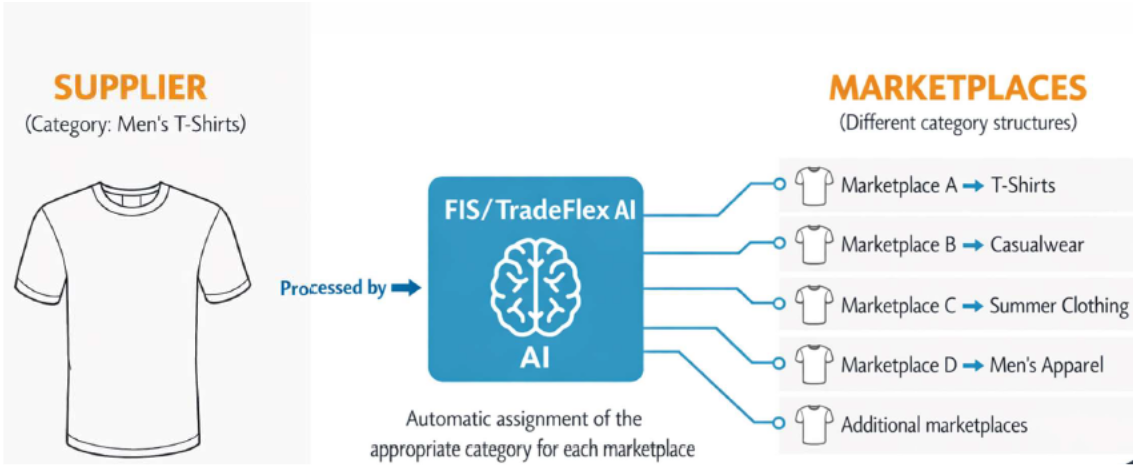
FIS/TradeFlex is the connecting element between your SAP system landscape and the online marketplaces of your choice. Integration takes place with just a few clicks – and gets you started right away. All sales portals and activities can be managed centrally from a single application. Automated processes save you time, minimize errors and increase your marketplace sales.

How does it work ?

  • AI-bases assignment to customer article categories to marketplace categories
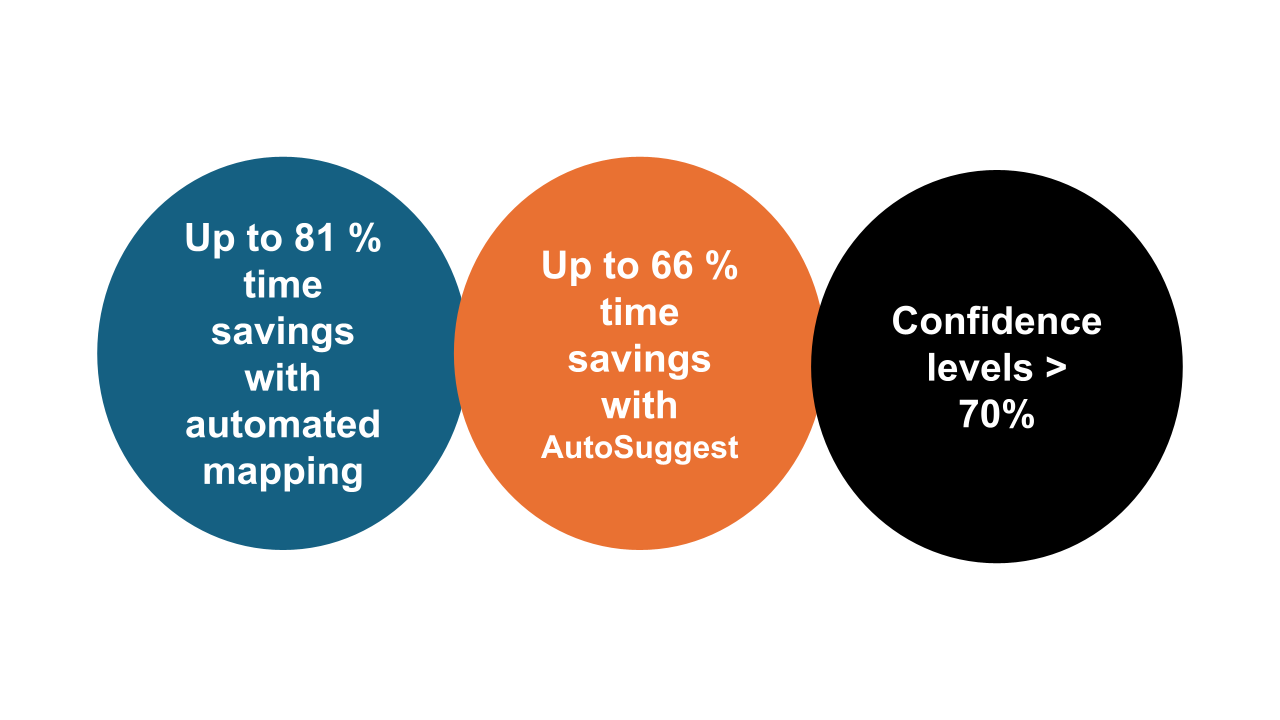
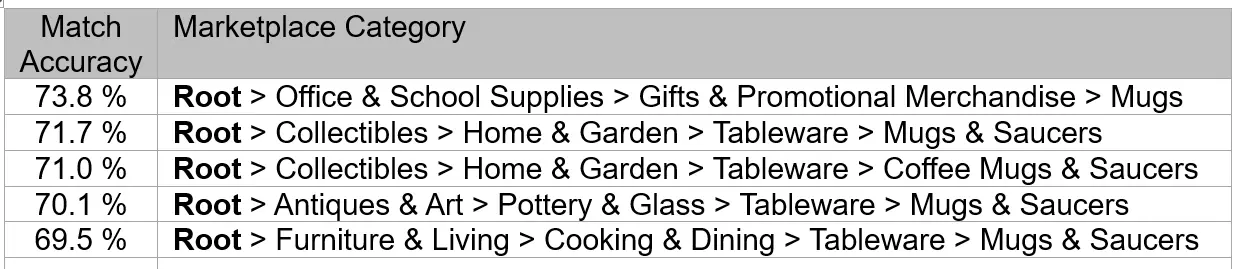
  • Assessment of AI results through a reliable confidence score

Key Benefits

  • No manual assignments to Marketplace categories.


Why is Automated Category Mapping so valuable?

  • In the marketplace business, the precise assignment of categories is crucial for the visibility of your products.
  • Incorrectly assigned items can lead to losses in sales as well as penalties by the marketplace operator
  • Manual categorization, for example through Excel lists or tedious individual comparisons, is extremely time-consuming.

How does category mapping work?

Key Advantages

  • Optimized embedding model for efficient and precise categorisation, tailored to the respective marketplace.
  • Qdrant vector database for fast and scalable data processing.
  • Confidence scoring for each category to evaluate the quality of the categorisation results transparently.
  • Easy connection of new marketplaces without additional interfaces.


2026 Releases: SAP Integrated SoftwareFIS / TradeFlex works with ManoManoFIS / TradeFlex FAQs FIS / TradeFlex (Video / Whiteboard) Fundamentals Current FIS / TradeFlex marketplace integrationsManoMano DIY eCommerce site integration with FIS / TradeflexAll on-line business platforms managed in one place


AI and Master Data Harmonisation (FIS / mpm)

10HomeDown, ProductsTags: ,

AI and Master Data Harmonisation (FIS / mpm)

FIS offers intelligent, customizable procedures for master data harmonisation using AI and machine learning. Duplicate checks for various SAP objects can be performed automatically – e.g., for vendor, customer or material data.

The solution serves as an important decision-making function for efficient master data maintenance.

How does it work?

  • Separation of the SAP master data into a staging area within FIS / mpm i.e. for duplication checks.
  • Data analysis using test routines and AI
  • Suggestions for recommended data correction
  • Import  of the corrected data from the FIS / mpm staging area into SAP.

Key Benefits

  • Significant improvement in SAP master data quality using AI to identify potentially errors and duplications.
  • No disruption of the SAP production process.


FIS-award-square

FIS awarded SAP Focus Partner 2023

00NewsTags: , ,

FIS awarded SAP Focus Partner of the Year 2023

FIS received the “Retail & Consumer Products - Partner of the Year 2023” award at this year’s SAP Diamond Initiative. This makes FIS an SAP focus partner and demonstrates its own expertise in all aspects of SAP solutions.

The FIS Group has strongly focused its business strategy on SAP and predominantly to the area of technology in the cloud. The commitment of FIS and the expertise developed was recognised at the 2023 SAP Diamond Initiative. FIS outperformed other SAP value added partners asserted and was awarded as “Partner of the Year” for “Retail & Consumer Products”.

FIS has built up a great deal of expertise, especially when it comes to the SAP S/4HANA solution and has developed its own technology solutions based on the SAP Business Technology Platform (SAP BTP). The technology solutions include:

  • FIS / fci (OCR document data reader) – for extracting the key data from a digitised document such as an invoice or sales order with minimal human effort.
  • FIS / edc (invoice monitor) – for posting invoices automatically into SAP ERP when they meet specific criteria (i.e. quantity and amount matching) and automatically forwarding payment exempt invoices to the correct teams and individuals.
  • FIS / mpm (master data and price management) – an SAP integrated tool for bulk uploads of data into SAP and a compliant method of adding new or creating new data in SAP.

In addition, FIS / TradeFlex enables the seamless connection of online marketplaces to order-to-cash and returns processes from a single application.

FIS NEWS LOGO

Master Data Quality Starting at the Source

00SAP Master Data and Price ManagementTags: , ,


SAP Master Data Quality Improvements Starting at the Source

Master data created in a pre-defined process involving employees with expertise where it is needed. FIS / mpm is deeply integrated with SAP.

Many organisations create master data in their ERP systems on an unscheduled and ad hoc basis. This often leads to errors and is one of the reasons for poor data quality. A direct consequence of this master data creation process is decreasing satisfaction among employees, vendors and customers.

To solve these issues, FIS Information Systems has developed a new way for optimising the process of creating, maintaining and managing master data. FIS have developed an SAP add-in technology that requires no modifications to SAP standard.

Governance – New Master Data and Maintenance

The FIS / mpm (master data and price management) software allows users to create new data with pre-defined forms and workflows. Within the technology a “staging area” is able to:

  • store master data under review
  • import and export data with SAP
  • allow (mass) imports of master data (i.e. from other ERP systems) in various formats
  • make bulk changes to data (i.e. increase material/article prices on a given date).

With FIS / mpm, employees are integrated into a defined maintenance process even if they do not have the authorisation to maintain master data. They do not need to have sufficient knowledge of a specific data record structure.

The FIS / mpm “staging area” uses its own tables and namespace within the SAP environment and is fully integrated with SAP (ECC 6, S/4HANA, Private Cloud etc). Essential tasks are now distributed to individuals or user departments. Missing data is supplemented and inaccurate data is corrected where the expertise is, applying quality control early in the data creation process.

Forms can be created for changing or creating master data, which can be filled in without any knowledge of organisational structures or master data classes. Users enter exactly the data they know and the rest is supplemented automatically or requested from other employees involved by using a workflow.

At the same time, this tool provides numerous options of automatically carrying out enrichments or enhancements. Erroneous entries can be minimized in this way.

Using this method, data can be enriched within the enterprise and without risk. 

Data Quality and Business Processes

Data quality has to be considered during the modelling of business processes. So a data maintenance tool must be capable of being integrated into the business processes to provide a seamless interface to master data creation and change for users.

For this purpose, FIS / mpm can be called via a fast access button for instance. This enables employees to directly access their master data worklists from a specific transaction. The fast access button can also be implemented at other points, i.e. wherever employees get in touch with business processes requiring direct access to generating a master data creation or change request.

Continuous Data Checking and Governance

With FIS / mpm, the data quality is checked at regular intervals during the master data creation/ change process. Defining the responsibilities when dealing with master data is a data governance topic. The FIS / mpm architecture allows for the entry of master data by each person involved in a specific business process and not just by the master data manager. This master data is temporarily stored in the “staging area” tables and submitted to the person responsible for the release.


FIS EDC invoice processing diagram

00SAP Invoice ProcessingTags: , , , , ,

Make savings by automating invoice postings in SAP

FIS invoice processing technology automates data-entry, freeing up accounts payable resource. Invoices are processed in any layout, in different languages and currencies. The invoice processing  technology assists with supporting colleagues working from home.

Introduction

FIS develops software that computerizes repetitive digital tasks that are normally carried out by people. The technology combines emulating how humans read computer screens and collecting data to automate tasks in the future.

The invoice processing technology reduces accounts payable workload and generates financial savings for organisations.

  • Reducing overall workload and manual data-entry tasks
  • Posting a high percentage of invoices automatically into SAP (no touch processing)
  • Automatically forwarding FI (PO- exempt) invoices to individuals or groups
  • Providing a familiar SAP environment for invoice queries and approval workflow

Automated invoice data collection 

FIS have developed one of the most effective technologies used for collecting key supplier invoice data from a scanned or emailed attachment. By introducing technologies into the invoice data collection process there is less manual keying and improved invoice data quality. Key invoice data can now be read from invoices with different formats, languages or currencies.

SAP integrated invoice matching and posting 

As an integrated add-in to standard SAP, the invoice monitor technology enables invoices to be posted automatically. Parked invoices can be directed to designated approvers or groups.

The invoice monitor, FIS / edc, complements SAP ERP, creating new functions for the accounts payable team and approvers. The invoice monitor referencing real-time SAP data and enables incoming invoices to be identified as either payable or parked.

In addition workflows are incorporated into the invoice monitor to manage approvals. Additional functions are aimed at invoice assignments and complex invoice coding tasks.

In combination, FIS offer an enhanced process that releases accounts payable teams from routine tasks and reduces workload. A high proportion of invoices are posted to SAP without any manual intervention

Functions of OCR Reader and Integrated Invoice Processing

Key Benefits

Reduced Effort for AP Team and Machine Learning. Invoice content is collected automatically from day-one, so manual data-entry tasks are reduced. In time, the  data collection technology "learns" the zones where the key data on an invoice resides for each supplier in a "knowledge database".  This means that key data is read automatically from the electronic invoice.

Invoices (MM) that agree with the original PO and Goods Receipt Note (GRN) in SAP could be posted automatically. PO exempt invoices (FI) can be assigned to accounts and forwarded automatically to individuals or departments.
Improved data quality. In the invoice data extraction component, invoice data is checked against SAP tables for vendor, company code and PO recognition. Net, tax and gross values are calculated to ensure that the data has been read correctly. Furthermore, the document can be classified (invoice, credit-note.. etc.) and assigned to the correct company code automatically.
Rapid adoption. As with all FIS add-in technologies, FIS / edc complements and works with standard SAP ERP (SAP ECC 6 or S/4HANA) presenting data from SAP transactions and new FIS transactions to assist with invoice queries.
Accounts Payable teams work within standard SAP GUI display formats and approvers use FIS / edc approval workflows running on SAP Web Dynpro and Fiori App standards. By developing proprietary technologies using SAP platforms means that FIS applications are easy to adopt for organisations already familiar with standard SAP.
Deep integration with SAP standard. FIS / edc harnesses the intrinsic power of SAP with no modifications to SAP standard being necessary. The processing technology presents information in real-time from the SAP database. SAP add-ins are easier to maintain when SAP upgrades and enhancement packs are introduced.

Invoice processing remote working

Flexible  / Hybrid working
Many FIS customers have adapted to the change in working practices of working fully or partially from home. Firstly, most customers have worked with their suppliers to further increased the proportion of invoices received via email - and reduced the volume received in paper format.
In this way, invoices are read automatically and manual completions, if required, can be actioned remotely. FIS / edc is also able to accommodate electronic invoices (EDI) and checks their credentials before posting.
Adopting an electronic method of invoice recognition means that organisations are not unduly hindered by the accounts payable team working from home.


reconciliation balances

Automated Statement Reconciliations

00HomeTop, Products, SAP Statement ProcessingTags: , ,

Automated Statement Reconciliations for SAP 

The FIS monitor provides automated statement reconciliations between vendor balances in SAP and the vendor statements. The SAP integrated application may also be used to reconcile payment advice notes from customers.

balances illustrating automated statement reconciliation

FIS / edc (statement monitor) is an integrated SAP technology that reduces the workload  when reconciling vendor statements or customer payment advice notes (remittances).

The automated statement reconciliation process can be then be achieved in less time and more economically than with SAP alone.

By freeing up time and reducing workload, the Accounts teams can then focus only on the invoices discrepancies between the statement data and SAP vendor data.

Releases of the technology run with both SAP ECC 6 and SAP S/4HANA. The application is able to process both vendor statements and customer payment advice notes in a single SAP add-in technology.

The integrated software in normally paired with the FIS OCR reading technology. This key data reading application automates the  data entry of key data from the statements. Statements can be also received via email attachments.

Automated Statements Reconciliations for Vendors

Vendor Statements usually take a lot of time to reconcile manually. In most instances - all statements are compared with the vendor account balance on SAP.

The statement monitor is focused on identifying vendors with unequal reconciliation balances compared to SAP. The solution’s main advantages include:

  • Reduced workload on the Accounts Payable team, who now only review vendor accounts with unequal balances
  • Ability to identify specific invoices from vendors that have been received or could have been misplaced
  • Improving the efficiency of the accounts payable team - who now only review reconciliation exceptions identified by the statement monitor
  • Statement data is automatically compared with the vendor balances in SAP on the date of the statement

Summary

For organisations who wish to make savings by introducing an automated statement reconciliation  process of reviewing vendor statement balances.

The statement monitor filters exceptions - statements that do not reconcile against vendor balances in SAP on the date displayed on the statement.

An alternative to

  • Manually reconciling statements against SAP vendor records
  • Spending time identifying which invoices from the statement are not in agreement with SAP

Highlights and key benefits:

  • Automatic OCR reading of vendor reconciliation contents from an emailed attachment or a scanned document 
  • Automatic comparison of data from the vendor data within SAP, filtering statements with non-zero balances
  • Identifies invoices potentially in dispute or lost invoices
  • Manual comparison of data now diminished, account team now directed to reconciliations where assistance is required
  • Vendor data from the document is compared with data in SAP in familiar a SAP GUI

Automated Payment Advice Note Reconciliations 

The document monitor can also be utilised to increase the level of automation and decrease the level of manual tasks required when reconciling customer payment advice notes (remittance advice notes).

Using the monitor, customer remittances can be matched and subtracted automatically from the outstanding invoices records in SAP prior to the payment reconciliations with the bank.

Therefore the automated process creates savings and improves matching accuracy.

Highlights and key benefits

  • Identifies invoices sent to customers that have not been acknowledged
  • Improves the efficiency of the accounts receivable team - who now only review reconciliation exceptions
  • Fewer manual comparisons of data required 
  • Customer data from the document is compared with data in SAP within a familiar SAP environment GUI  and therefore easier and quicker to adopt

Automated Data Entry from Day One

Governance logo

FIS / mpm – Simplified Master Data and Price Management

10HomeDown, ProductsTags: ,

Simplified Master Data and Price Management

FIS / mpm (Master Data and Price Management) aligns specific routes and roles when creating master data in SAP. A staging area with a shadow database ensures the trouble-free exchange of master data with SAP Production.Master Data complexity solved

The FIS / mpm (master data and price management) application has been developed specifically for organisations with SAP ERP who face issues when adding new or maintaining existing master data. The FIS technology also provides functionality to upload large data volumes. The FIS technology is an "SAP centric" application that runs on SAP standards (i.e. with familiar SAP GUIs, Fiori and NetWeaver interfaces). FIS / mpm is an add-in application, deeply integrated into SAP standard with releases for both either SAP ECC 6 and SAP S/4HANA. The technology functions by using a staging area using tables in a shadow database. The technology eliminates the need for file exchanges and data mapping between SAP and non-integrated software. One of the primary functions of the application is to address the issue of master data governance. FIS / mpm provides a clear method of controlling master data updates for all participants in pre-defined roles. SAP master data team members are called on at the final stage only, releasing the new data into SAP Production. The software reduces the workload of SAP master data managers from routine tasks. Staging area and shadow database

Maintaining and storing big datasets is very time-consuming and cost-intensive. Due to the multitude of materials, it is particularly important  to automate the data creation and maintenance processes. 

The FIS / mpm shadow database is used as a "holding area" to store the data that needs addressing. The data is imported and copied from from SAP Production. No modifications to SAP standard are required.

Master Data Management Diagram Central to the  application is the staging area. These data tables are created, modified, enhanced, checked within FIS / mpm prior to the master data being transferred to SAP ERP. Identifying Most Common Processing Issues FIS / mpm fundamentally addresses the most common issues when creating master data in SAP.
  • Inefficient use of email as a workflow tool
  • Working with complex and bespoke Excel spreadsheets with multiple worksheets that are difficult to maintain
  • Processing data that includes detailed data completion notes
  • In-house solutions that required bespoke coding
  • SAP master data team called upon for assistance on basic tasks
  • Working with external applications that exchange files with SAP standard - which can cause issues with table synchronisation with SAP upgrades and enhancement packs
  • No governance with the process of creating and checking data prior to transferring into SAP
Governance Issues with non-defined roles mean that employees that may have the most expertise of the data (i.e. for vendors, customers, materials, prices etc.) may not be aware of the stringent data requirements of SAP. In practice this usually results in data omissions and invalid fields. Secondly, the SAP data custodians may have the knowledge of the strict master data stipulations of SAP but may have less knowledge of the initial data that is being added or maintained. FIS / mpm reduces the time taken by senior master data teams correcting minor errors from initiators. Schematic of SAP add-in technology with file options

Roles and processes defined

In an effort to resolve the most common issues, FIS / mpm defines typical roles (Initiators, enrichers, SAP key-users, SAP power-users etc.) and workflow procedures for SAP ERP master data. This means that data is reviewed by the correct people and in a stringent process and workflow and therefore controlling way master data is created and maintained. FIS / mpm addresses the core issues by defining the common tasks within the process and then providing a methodology controlled by the SAP master data team.
  • FIS / mpm provides an easy-to-use interface at source for the data initiators - significantly reducing the number of fields for completion, identifying mandatory fields and provides drop down choice selections for data import
  • Bulk uploads can created from FIS / mpm by defining Excel worksheets with clearly labelled tables
  • The FIS / mpm Web Dynpro workflow module allows  data checking by a supervisor
  • The FIS / mpm application validates fields for feasibility and completeness prior to advancing the data to the SAP supervisors
  • The FIS / mpm staging area is a workplace that provides a checking area before releasing of master data into SAP.
Complete and up-to-date data with the FIS / mpm Analysis Tool Keeping the data integrity the system correct and up-to-date is a big challenge for enterprises. Checking and comparing all data is very time-consuming and is therefore rarely carried out regularly. This is where the analysis tool from FIS /mpm comes in. The analysis tool checks the entire dataset either at defined points in time or manually initiated using pre-defined criteria. In this way, for example, the address data of customers is regularly checked for completeness. For incorrect data records, a data maintenance process can then be started with FIS / mpm. This automatically forwards the incomplete or incorrect data records to the appropriate person responsible for processing. The fields can also be filled automatically if, for example, the information in another field is identical or indicates the content of the field. In this way, the completeness and correctness of all data records can be permanently improved without much manual effort.
Summary
For organisations who wish to save time and effort when creating new or maintaining existing master data within SAP. For organisations who wish to create clear roles and governance for master data changes and additions.
An alternative to:
  • Complex forms and Excel sheets for participants with data expertise moving backwards and forwards between parties
  • Using Email as a workflow – no clear governance on processes – process unlikely to capture all necessary data comprehensively
  • Tasking SAP experts with minor data management issues
  • Inefficient methods of data management handling in SAP
Key technologies and benefits:
  • Versions available for SAP ECC 6,  SAP S/4HANA, SAP Private Cloud
  • Flexible Data Imports including data from Excel, SAP ERP, Financial Accounts Systems and other ERP systems
  • Web Dynpro workflow – allows participants with minimal SAP expertise create new and maintain master data
  • Ability to ensure clear governance of roles and responsibilities – from initiation to final SAP release
  • Allows bulk upload of master data (Excel) as well as single records
  • Provides intelligent data validation checks prior to transfer into the FIS / mpm staging area
  • FIS / mpm staging area provides final checking of data before release into SAP ERP
  • Automatic reports to show the success of data transfers into SAP ERP
  • Timed events to release data from FIS / mpm staging area into SAP ERP
FIS / mpm components
FIS / mpm is currently available in English, German and French with further versions available on request. Releases available for SAP ECC 6 and SAP S/4HANA
  • Article master, purchasing info records and source list
  • Vendor master
  • Customer master
  • Bill of materials
  • Document Maintenance
  • Conditions
  • Sales Functions